Spark Hire Retakes: How Takes Work in a One-Way Video Interview
Candidate Falcon
Editorial Team

If your Spark Hire invitation says you have two takes, three takes, or only one take, that number matters. It tells you how many recordings you can make for a question before you submit an answer. A retake is not a general reset of the interview. It is another attempt at the current question, and the employer decides whether that option is available.
Spark Hire’s One-Way Video Interview guide describes the process clearly: each question can have its own think time, take allowance, and response time limit. After you record, you can review the video. If retakes are available, you can record again. When you are satisfied, you submit the response and continue.
That setup creates a practical question for candidates: should you use a retake just because the first answer was not perfect? Usually, no. The best approach is to understand what a take is, check the rules in your invitation, and use an additional attempt only when it will materially improve the answer.
What does “takes” mean in Spark Hire?
In Spark Hire, the number of takes is the number of recording attempts allowed for a question. If the employer allows three takes, you can record the answer up to three times before you need to submit it or move on according to the options shown on screen.
The allowance is configured by the organization running the interview. There is no universal Spark Hire rule that gives every candidate the same number of recordings. One employer may allow one take. Another may allow two or three. Some questions in the same interview may have different settings.
The word “take” refers to a recording attempt, not the amount of time you can spend preparing. Spark Hire separates several parts of the question experience:
- Think time: how long you have to read the prompt and plan your answer before recording begins
- Takes: how many recordings you can make for that question
- Time limit: how long each recorded response can be
These settings work together. A question with unlimited think time but one take gives you time to plan, but no second recording if the answer goes badly. A question with limited think time and two takes gives you less time to prepare, but a chance to try again.
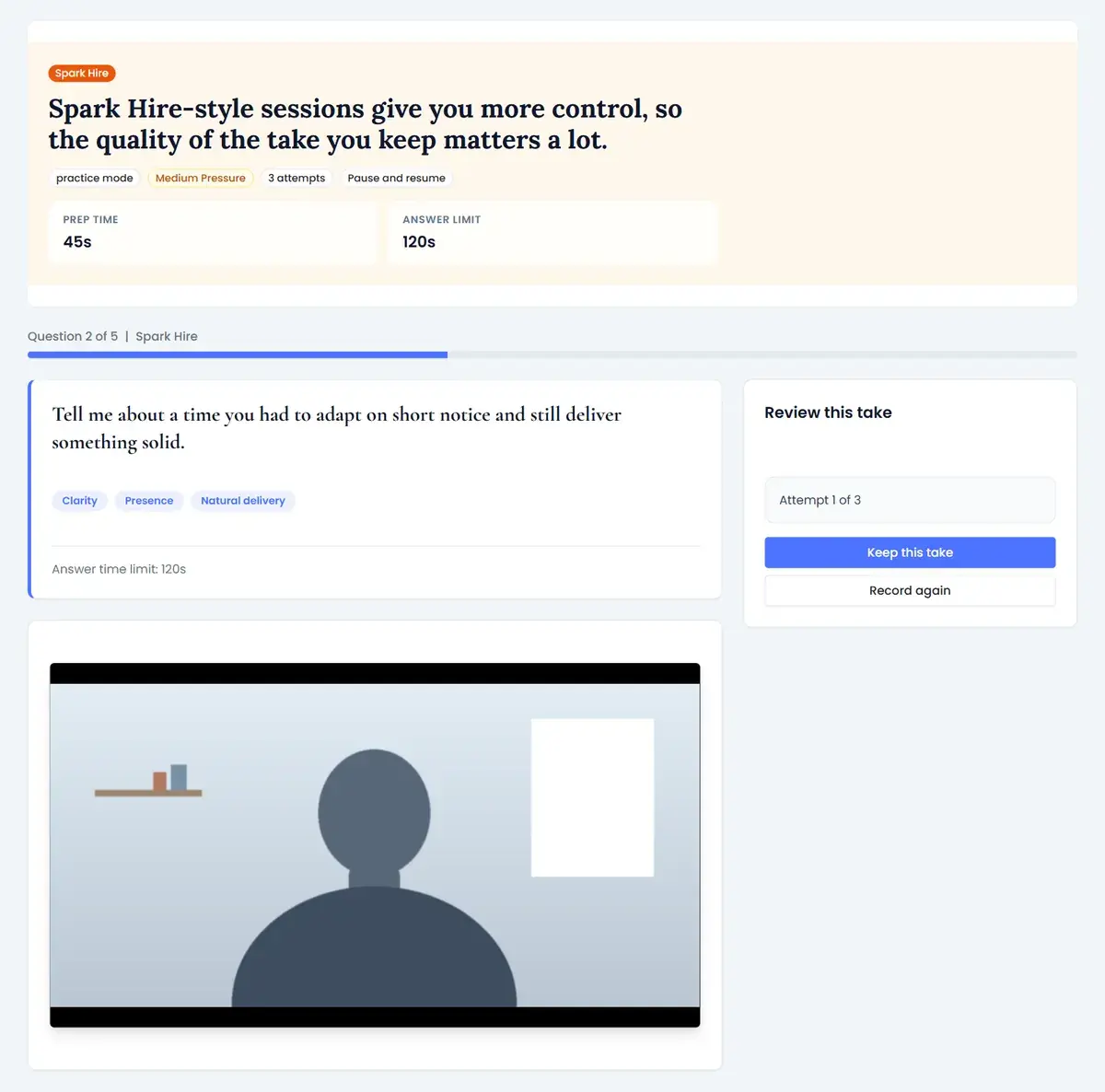
How the retake process works
The exact labels may vary slightly with the interview experience your employer is using, but the candidate journey follows the same basic pattern.
First, you complete the setup and practice stage. Spark Hire lets you check your camera, microphone, and connection before the real questions. You may also record a practice video and review it. The practice recording is there to help you get comfortable with the interface. It is not the same as a retake on an employer’s interview question.
When you reach a question, you see the prompt and the timing information. If think time is limited, a countdown may start and recording can begin automatically when it ends. If think time is unlimited, you can start recording when you are ready.
After you stop recording, the video plays back for review. This is the point at which you decide whether to submit the answer or use Retake, if the option is available. A retake records another version of the same response. It does not erase the question, add more think time after you have used the recording, or give you unlimited chances.
If you run out of takes and do not want to submit the latest recording, Spark Hire may show an option to skip the question. Whether skipping is possible depends on how the interview was configured. Do not assume that a skipped question can be completed later.
Once you submit an answer, you generally move to the next question. Treat submission as a decision to keep that recording. Before clicking Submit, check the video and listen for the practical issues that can make an otherwise good answer difficult to assess: an incomplete sentence, a microphone problem, a missed part of the question, or an answer that never reaches an example or result.
Can you retake a Spark Hire interview answer?
You can retake an answer only when the employer has enabled multiple takes for that question. Spark Hire does not let candidates create extra attempts outside the configured limit.
The invitation or the question screen is the best source for your specific rules. Look for the number of takes shown alongside the think time and response limit. If the invitation does not explain the setting, you may need to begin the walkthrough to see the information before the question starts.
Do not confuse a technical practice recording with a retake. You can normally review and repeat the practice video while testing your setup. That flexibility does not tell you how many attempts you will receive on the scored or reviewed questions.
The same principle applies to the interview deadline. Spark Hire may let you pause and return to the interview using the same link before the deadline, but pausing is not the same as restoring a used take. Returning later can help you manage the overall interview window. It does not normally give you another attempt on a question you have already submitted.
When should you use a retake?
A retake is most useful when the first recording contains a clear problem that you can fix quickly. Good reasons include:
- You misunderstood the question or answered a different question.
- The recording stopped before you finished your point.
- A technical issue affected the audio or video.
- You gave a vague answer and can replace it with one specific example.
- You know the main content is right but the structure became confusing.
Do not use a retake simply because you noticed one imperfect phrase. Interview answers are spoken, not written essays. A short pause, a natural hand movement, or a sentence that you rephrase is usually less damaging than using another attempt without a plan.
Before you click Retake, name the one change you will make. For example, decide to lead with the answer, use a shorter example, or reserve the last fifteen seconds for the result. If you cannot identify the change, the second attempt may sound very similar to the first.
If the first answer is clear, relevant, and complete, submitting it can be the stronger choice. Re-recording can introduce new risks: you may rush, lose the example you had, or spend too much attention trying to look perfect. Your goal is a credible answer that responds to the prompt, not a performance with no visible imperfections.
A simple decision rule after each recording
Use this quick review before deciding:
- Did I answer the exact question? Check the opening sentence. It should make clear what you are responding to.
- Did I provide evidence? For a behavioural question, name the situation and your specific action, not just what the whole team did.
- Did I finish the thought? Use the final seconds for the result, lesson, or reason the example matters.
- Can the reviewer hear and see me? Check for audio dropouts, severe glare, framing problems, or an accidental interruption.
- What one change would make a retake better? If the answer is specific, a retake may be worthwhile. If not, submit a solid response.
The review does not need to become a full performance critique. You have limited time, and repeatedly watching a recording can make you doubt a perfectly usable answer. Check relevance, completeness, and technical quality, then decide.
How to prepare when you may have one take
Prepare for the strictest version of the interview: limited think time and one recording. If the employer gives you extra takes, treat them as a safety net rather than part of your plan.
Start by preparing a small set of adaptable stories. Choose examples about solving a problem, working with another person, handling a setback, managing priorities, learning quickly, and why you want the role. For each story, write four prompts rather than a script:
- Situation: where and when it happened
- Task: what you needed to accomplish
- Action: what you personally did
- Result: what changed or what you learned
Practise saying each story in the time limit shown in your invitation. If you do not know the limit, try one minute first. Record yourself on the same device and from the same position you plan to use. Practise starting with a direct answer, then give the example, then close with the result.
Candidate Falcon can help you rehearse one-way video responses with a camera, timer, and feedback before your Spark Hire deadline. The useful practice target is not a perfect take. It is being able to choose an example and explain it clearly while the timer is running.
What to do before the first real question
Use the practice video to check more than whether your face appears on screen. Confirm that your voice is clear, your camera is at a comfortable height, and your light is in front of you rather than behind you. Remove notifications and close unrelated tabs. Keep your notes short and close to the camera if you use them, but do not write full answers that encourage you to read.
Read the invitation again before starting. Note the submission deadline, device requirements, response times, and any instructions about retakes. The employer’s settings control the interview, so the information attached to your invitation is more relevant than a general promise that Spark Hire allows multiple takes.
Give yourself enough uninterrupted time to finish. Spark Hire says candidates can complete a one-way interview on their own time before the deadline, and the platform may let you pause and return later. Even so, a quiet block is better than squeezing an answer between meetings or attempting a retake while someone is waiting outside the room.
Common mistakes with Spark Hire retakes
The most common mistake is spending the first take discovering how the controls work. Use the practice recording for that. Learn where the timer, stop, playback, submit, and retake controls appear before the real question begins.
Another mistake is assuming that every question has the same allowance. Look at the information for each question. The employer can set different timing and take limits, so carry your preparation habits with you but not an assumption about the number on screen.
Finally, do not wait until the last minute because you expect to use multiple takes. A technical issue, a slow connection, or a question that needs more thought can make the deadline feel much closer. Submit early enough to review the final status and contact Spark Hire support or the employer if something goes wrong.
The practical answer about Spark Hire takes
Spark Hire takes are employer-configured recording attempts for an individual one-way interview question. You may be able to review an answer and retake it, but only within the number of takes provided. Think time, response time, and retake allowance are separate settings.
Prepare as if your first take counts. Use the practice video to learn the controls, build a few flexible examples, and rehearse within the time limit. If a retake is available, use it for a clear, fixable problem and decide what you will change before recording again.
That approach gives you the benefit of a second attempt without depending on it. When the Spark Hire screen appears, you can focus on answering the question instead of trying to guess how many chances you have left.
Practise your next one-way video interview with Candidate Falcon before you submit your Spark Hire responses.