How Do I Prepare for a HireVue One-Way Video Interview as a Job Seeker?
Candidate Falcon
Editorial Team

You just got a HireVue invitation. The deadline is 48 hours away, and you're not sure what to expect. That's a more common situation than you might think — and the candidates who struggle most aren't the ones with weak answers. They're the ones who didn't realize how different this format actually is from anything they've done before.
This guide answers the question directly: what do you need to do to prepare, and in what order?
What Is a HireVue One-Way Video Interview?
A HireVue one-way video interview is asynchronous. You receive a set of questions, record your answers on camera, and a recruiter or hiring manager reviews them later. There's no live person on the other side — no back-and-forth, no chance to clarify a question mid-answer.
That distinction matters more than most candidates expect. In a live interview, you read the room. You adjust your pace, add context, recover from a shaky answer with a stronger one. In a HireVue one-way interview, each response stands on its own. You typically get a short preparation window — often 30 seconds to 2 minutes — before recording begins, and a fixed time limit per answer, usually 2 to 3 minutes.
HireVue also applies AI analysis to recorded responses. The system evaluates verbal content, communication clarity, and in some configurations, non-verbal signals as well. More on how that works below.
One-way video interviews are now standard at many large employers. Other platforms like Spark Hire, Talview, and VidCruiter operate on similar principles, but HireVue is the most widely used — and it has specific mechanics worth understanding before you sit down to record.
Step-by-Step Prep Timeline
If You Have 24 to 48 Hours
This is the most common scenario. Here's how to use the time well.
Hour 1: Read the invitation carefully. Note the deadline, the number of questions, the time limits per answer, and whether there's a preparation window before each question. Some HireVue invitations include a practice question before the real interview begins. Use it.
Hours 2 to 4: Research the role and company. Pull the job description and identify the three or four core competencies the role requires — leadership, analytical thinking, client communication, problem-solving. These almost always map directly to the questions you'll get. HireVue behavioral questions follow predictable patterns.
Hours 4 to 6: Build your answer structures. Write out two or three STAR-format stories that cover your strongest competencies. You'll adapt them on the day, but having them drafted means you're not constructing examples from scratch under pressure.
Hours 6 to 8: Practice on camera. This is the step most candidates skip. Recording yourself and watching it back is uncomfortable — but it's the fastest way to catch filler words, poor framing, and pacing issues. Record multiple takes of the same answer.
Hours 8 to 24: Rest, then do a final run-through. Fatigue affects how you come across on camera more than most people realize.
If You Have 3 to 7 Days
Use the extra time for deliberate practice, not just more research.
- Day 1: Understand the format and the company
- Days 2 to 3: Build your answer library using STAR
- Days 4 to 5: Record practice responses and review them critically
- Day 6: Fix specific problems from your recordings — eye contact, answer length, filler words
- Day 7: Final full run-through under timed conditions
The goal is to reach the actual interview having already experienced the pressure of recording yourself against a clock. Familiarity with the format makes a real difference to how settled you feel when it counts.
Technical and Setup Checklist
HireVue interviews happen in your environment, which means you control the variables that affect how professional you look and sound. Don't leave these until the last minute.
Camera and framing: Use a laptop or desktop camera positioned at eye level. Stack books under a laptop if needed. Frame yourself so your head and shoulders are centered, with a small amount of space above your head. Look at the camera lens, not the screen — this is the single most common mistake candidates make.
Lighting: Natural light from a window in front of you is ideal. If you're recording at night or in a dim room, use a ring light or desk lamp positioned in front of you — not behind. Avoid backlighting. A bright window behind you will make your face appear dark on camera.
Audio: A quiet room matters more than an expensive microphone. Close windows, turn off fans, and silence your phone. Earbuds with a built-in microphone often produce cleaner audio than a laptop's built-in mic.
Background: Plain walls work well. A tidy bookshelf is fine too. Avoid busy or cluttered backgrounds. Virtual backgrounds can look artificial and sometimes glitch at the wrong moment.
Internet connection: Use a wired connection if possible, or sit close to your router. Close other browser tabs and apps that use bandwidth before you start.
Browser and permissions: HireVue runs in a browser. Use Chrome or Firefox, updated to the latest version. Grant microphone and camera permissions before you begin, and test both.
How to Structure Your Answers: The STAR Method
HireVue behavioral questions almost always follow the "tell me about a time when..." format. STAR is the most reliable structure for answering them cleanly.
- Situation: Set the context briefly — one or two sentences.
- Task: What was your specific responsibility or challenge?
- Action: What did you do? This should take up the majority of your answer. Be specific about your individual contribution.
- Result: What happened? Quantify where you can.
The most common mistake is spending too long on the Situation and not enough on the Action. Recruiters and AI systems both respond to specificity and agency. "I led the team to..." lands differently than "We decided to..."
Aim for 90 seconds to 2 minutes on a 3-minute question. Finishing 45 to 60 seconds early is perfectly fine. Running right to the limit usually means you're padding.
How HireVue's AI Evaluates Your Responses
HireVue uses AI to analyze recorded responses, though what's measured varies by employer configuration. At a high level, the system looks at the content of what you say, how you communicate it, and in some cases, behavioral signals like eye contact and vocal delivery.
Verbal content is analyzed for relevance, structure, and the presence of themes the employer has flagged as important for the role. Communication signals — speaking pace, clarity, filler word frequency — can factor into scoring. Non-verbal signals, including eye contact and facial expressions, are analyzed in some configurations.
You don't need to perform for the AI. You need to answer clearly, stay on topic, and speak with enough confidence that your communication reads as competent. The system isn't looking for a specific personality type — it's looking for evidence of the competencies the employer defined.
One practical takeaway: avoid long pauses, excessive filler words ("um," "like," "you know"), and extended periods of looking away from the camera.
Common Mistakes to Avoid
Reading from notes. Your eyes moving off-camera is noticeable. Brief glances are fine. Reading full sentences is not.
Answering in the abstract. "I'm a strong communicator" isn't an answer. A specific example is.
Going over time. Candidates who run to the very end of the limit often do so because they're padding. Finish your point and stop.
Skipping the practice question. HireVue usually provides one before the real interview starts. Use it to check your framing, audio, and lighting — not just to hear yourself talk.
Recording in a noisy environment. Background noise is distracting and signals a lack of preparation.
Not practicing on camera beforehand. Seeing yourself on screen for the first time during the actual interview is a real disadvantage. The format is disorienting enough without that added pressure.
Using Candidate Falcon to Prepare
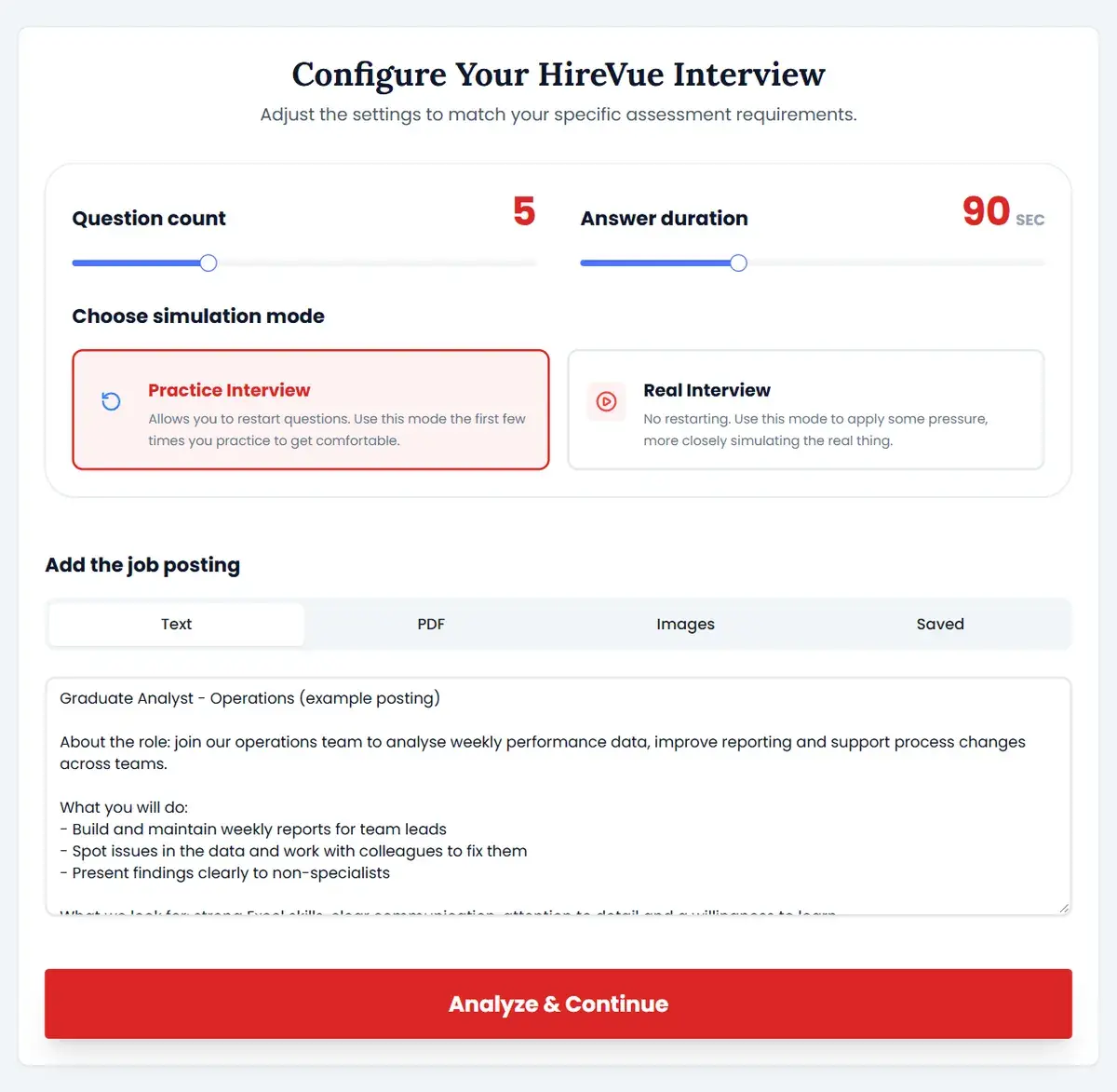
If you want structured, HireVue-specific practice before your interview, Candidate Falcon offers a dedicated preparation module built around exactly this format.
The platform includes a HireVue-specific question library, unlimited practice recordings, and AI-powered feedback on your recorded responses. That feedback covers communication signals like pacing, filler words, and answer structure — so between takes, you have something concrete to work on rather than just watching yourself back and guessing what to fix.
The platform is built around the 24 to 72 hour prep window, which means it's designed to be fast and focused. You're not working through a generic interview course. You're practicing the specific format you're about to face.
Start preparing at candidatefalcon.com.
FAQs
How many questions does a HireVue one-way interview typically have?
Most include between 3 and 8 questions. The exact number depends on the employer, and your invitation email usually specifies it.
Can I retake my answers in a HireVue one-way interview?
In most cases, no. Once you submit a response, it's final. Some employers allow one retake per question, but you shouldn't count on it — which is exactly why practicing before you start matters.
How long do I have to complete a HireVue one-way interview?
Most employers give candidates 3 to 7 days from the invitation date, though some set tighter windows. The deadline will be stated in your invitation email.
Does HireVue record my face even when I'm not speaking?
Yes. The camera is active during both the preparation window and your recorded response. Keep a composed, attentive expression throughout.
What should I wear for a HireVue one-way interview?
Dress as you would for an in-person interview with that employer — business professional or business casual depending on the company culture. Avoid busy patterns or bright colors that can look distracting on camera.
Does HireVue use AI to score responses automatically?
HireVue's AI analyzes responses and can generate scores or flags that inform recruiter review. How much weight those scores carry in hiring decisions varies by employer. Treat the AI analysis as one input among several, not the only one.
How is a HireVue one-way interview different from a Zoom interview?
A Zoom or Teams interview is live and synchronous — there's an interviewer on the other side in real time. A HireVue one-way interview is recorded and asynchronous. No one is present when you record, and your responses are reviewed later, often by multiple people.
Final Thought
The biggest advantage you can give yourself before a HireVue one-way interview is straightforward: practice recording yourself before the real thing starts. First-time candidates often underperform not because their answers are weak, but because talking to a camera with a countdown timer is genuinely disorienting the first time you do it.
Prepare your STAR stories, sort your setup, and get some recorded practice under realistic conditions. That's the preparation that actually makes a difference.